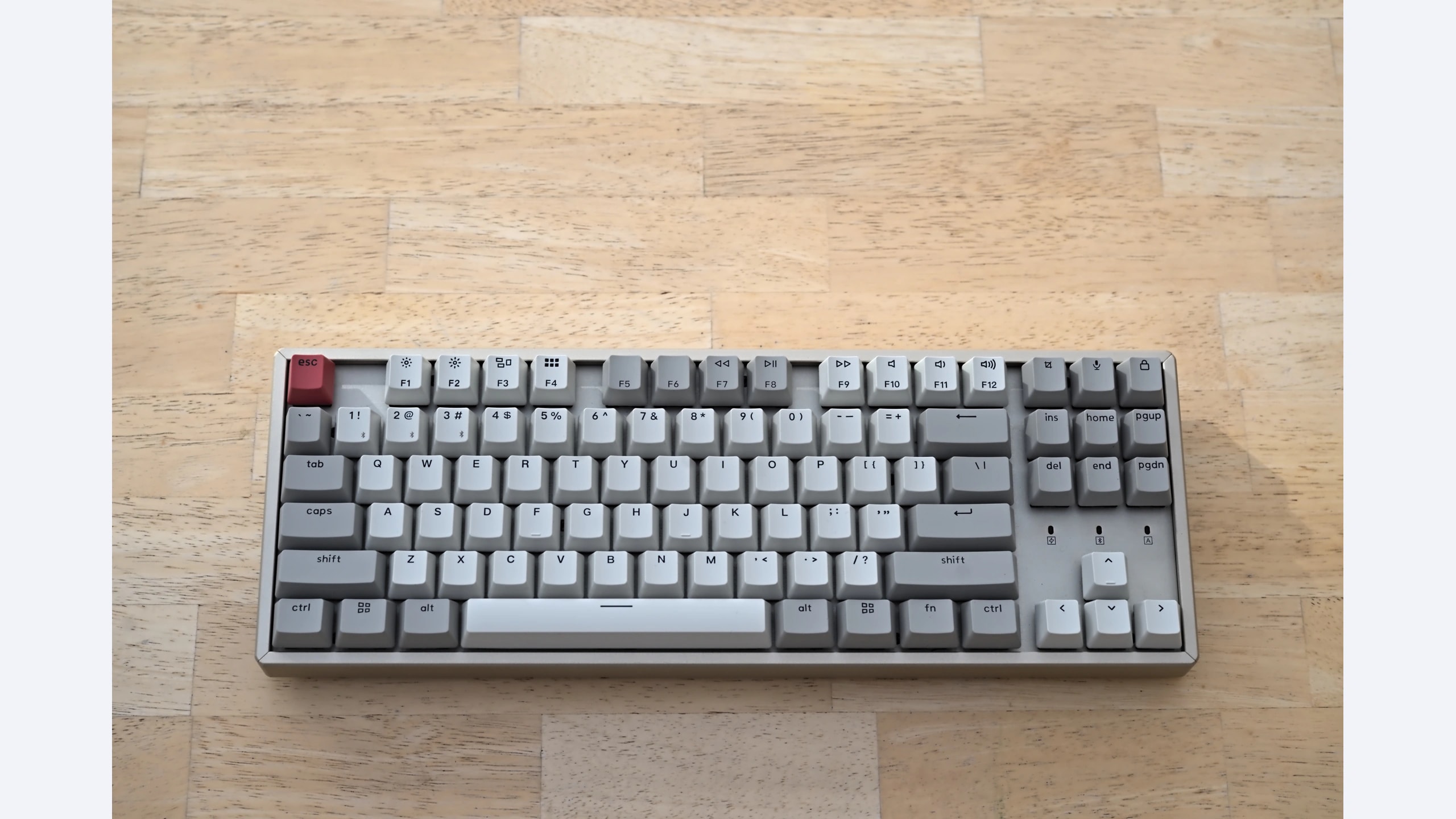
Removing the number pad creates more room for a mouse while preserving dedicated arrow and function keys. That makes a tenkeyless keyboard attractive for a desk shared between writing and games. The harder choice is the feel and behavior of the switches: a conventional tactile option, an intentionally clicky gaming board, or a very sensitive optical design. These three established TKL models illustrate those trade-offs. The original Keychron K8 adds Bluetooth, while the two gaming boards use wired connections. That difference should be part of the decision, not hidden behind a common layout label.
Scope: This guide compares the named established models, including legacy versions. It is not a ranking of the newest releases. Verify the exact revision and local availability before ordering.
How this comparison was researched: GearTrio has not hands-on tested these devices. We checked manufacturer documentation and independently published RTINGS tests on 22 October 2026. Test impressions belong to the linked reviewers; buying recommendations are our editorial interpretation. Older reviews and different test-bench versions do not establish a fresh head-to-head benchmark.
Three products at a glance
| Product | Connection / design | Main reason to consider it | Trade-off |
|---|---|---|---|
| Keychron K8 | Original K8; USB-C wired or Bluetooth | Multi-device typing and Mac-oriented layout options | Variants differ; original firmware lacks modern remapping |
| Logitech G PRO Keyboard | Wired; GX Blue clicky | Tactile and audible feedback with gaming software | Loud switches; not the hot-swap PRO X |
| Razer Huntsman Tournament Edition | Wired; Linear Optical | Sensitive actuation and durable-feeling PBT caps | Accidental typing inputs may be a concern |
Keychron K8
The original K8 is an 80-percent layout with wired USB-C and Bluetooth modes. Keychron’s non-backlit K8 documentation describes the photographed version, which must not be confused with the later K8 Pro, Max or HE. Backlighting, switch type and hot-swap capability depend on the exact K8 configuration. A listing that simply says K8 is therefore insufficient if switch replacement or a particular lighting feature is important to you. Confirm the selected variant before ordering.
RTINGS tested a backlit K8 with Gateron Brown switches in its K8 review. It found the tactile typing experience suitable for office use, while noting the original model’s lack of macro software and gaming-related connection limitations. Those observations should not be represented as a test of the non-backlit photographed unit. Shared layout and model family provide context, but switch feel, lighting and configuration details require an explicit variant check. The original K8 also should not inherit QMK features from newer Keychron ranges.
Our interpretation is that the K8 is the most relevant starting point here for someone who types across several devices and can select an appropriate switch. Use wired mode when connection responsiveness is a priority, and verify Bluetooth behavior on the computers you actually use. Check Mac/Windows keycap and mode requirements, as well as the keyboard’s height relative to your desk. A comfortable wrist position and a suitable switch matter more than buying every optional feature.
Logitech G PRO Keyboard
The G PRO Keyboard discussed here is the wired GX Blue clicky model. Logitech’s official information describes a compact gaming board with programmable lighting and a detachable cable. The similar PRO X name identifies a different switch-replacement proposition and should not be treated as an interchangeable listing. The original PRO does not become a general-purpose hot-swap board merely because the keycaps can be removed. That distinction matters when repairability or experimenting with different switches is the reason for buying.
In its G PRO test, RTINGS praised construction, gaming responsiveness and the feedback of the GX Blue switches, while warning that their clicky sound is a poor match for quiet shared offices. This is a meaningful usability difference, not just an aesthetic preference. A switch that helps you recognize actuation can also be audible on calls and distracting to people nearby. The review’s positive typing assessment should not erase that environmental limitation.
Choose the G PRO if you actively want audible click feedback and a straightforward wired gaming layout. Before purchase, listen to the switch in a realistic setting if possible, remembering that online recordings vary with microphone and desk. Check that the detachable cable is present and secure and that the needed software features work on your system. If you are unsure whether you like clicky switches, a short trial or permissive return policy is preferable to assuming a gaming label predicts typing comfort.
Razer Huntsman Tournament Edition
The original Huntsman Tournament Edition uses Razer Linear Optical switches, a TKL layout, a detachable cable and PBT keycaps. Its manufacturer information applies to that specific older model. It should not be confused with later Huntsman boards offering different actuation behavior or analog features. Optical describes the sensing system; it does not mean the keyboard accepts arbitrary replacement mechanical switches or provides user-adjustable actuation. Buyers seeking those functions need a different, explicitly documented product.
RTINGS found the keyboard responsive for gaming and appreciated its build and keycaps in its Tournament Edition review. It also found the sensitive keys could register unintended inputs while typing, with some stabilizer rattle on the sample. This is the central trade-off for a mixed-use desk: fast-feeling actuation can be pleasant during play yet less forgiving while writing. We do not convert that observation into a measured error rate or claim it affects every typist equally.
Consider it when you know you prefer light linear switches and gaming takes priority over forgiving text entry. If you rest fingers heavily on keys, test that habit during the return period instead of judging the board only by a quick game. Also check the condition of stabilizers and the supplied cable on older stock. A nominal bargain can be less attractive if adapting your typing style proves more disruptive than the saved purchase cost.
How to choose for your setup
Begin with your working environment. A home office used alone can accommodate a clicky board more easily than a shared room or microphone-heavy meeting routine. The G PRO’s audible feedback is intentional, while the other two options require their own switch and desk checks. No mechanical keyboard is guaranteed silent simply because it lacks a click mechanism; keycaps, stabilizers and how forcefully you type also contribute to sound.
Next, decide whether wireless switching is required. The original K8 offers that flexibility; the G PRO and Huntsman TE are wired. A Bluetooth keyboard can reduce cable clutter and serve multiple devices, but that convenience is separate from gaming latency. Avoid combining a Bluetooth measurement from one review and a wired measurement from another into a simplistic overall speed ranking. We have not conducted a common-condition test of these keyboards.
Inspect layout and upgrade plans carefully. TKL preserves arrows and function keys while removing the number pad, but regional ANSI and ISO layouts still differ. Check the Enter key, modifier sizes and legends you need. For the K8, verify whether the chosen configuration is actually hot-swappable. For either gaming board, do not assume ordinary switch replacement is supported. Keycap compatibility and switch compatibility are separate questions.
Finally, compare a complete exact-variant offer. Include a wrist rest if you genuinely need one, a suitable cable and any adapter required by your computer. These are established models, so local stock condition and warranty terms may matter more than launch positioning. We do not quote historical prices as current deals. Confirm the switch label and regional layout in writing before buying from a marketplace listing that mixes several variants.
Which one should you choose?
Choose the original K8 for flexible typing across devices, provided its exact switch and feature configuration suit you. Choose the G PRO when you specifically want GX Blue click feedback and a wired gaming setup. Choose the Huntsman Tournament Edition when sensitive linear actuation is a preference you have already established.
For a first mechanical keyboard, the most useful purchase protection is a verified variant and a practical fit-and-feel check. These three boards share a compact layout, but they serve different typing habits. The conditional recommendation follows manufacturer documentation and the linked reviewers’ experiences, rather than a claim that GearTrio tested them side by side.
Sources and exact versions
Manufacturer documents establish advertised features; RTINGS supplies the independently tested impressions discussed above. Consulted 22 October 2026. Linked reviews retain their own publication dates, updates and methodology notes.
- Keychron K8: official documentation; RTINGS hands-on review.
- Logitech G PRO Keyboard: official documentation; RTINGS hands-on review.
- Razer Huntsman Tournament Edition: official documentation; RTINGS hands-on review.
Explore more keyboard comparisons or read about GearTrio and our research approach.
Featured photograph: Keychron K8 only; the other two compared devices are not pictured. Non-backlit original K8; review used a backlit Gateron Brown variant. Photo: Triple-green, original source, CC BY 2.0. Resized to fit a neutral 16:9 canvas without cropping the device; converted to WebP. The adapted image retains this license. This is a third-party photograph, not evidence of GearTrio testing.
