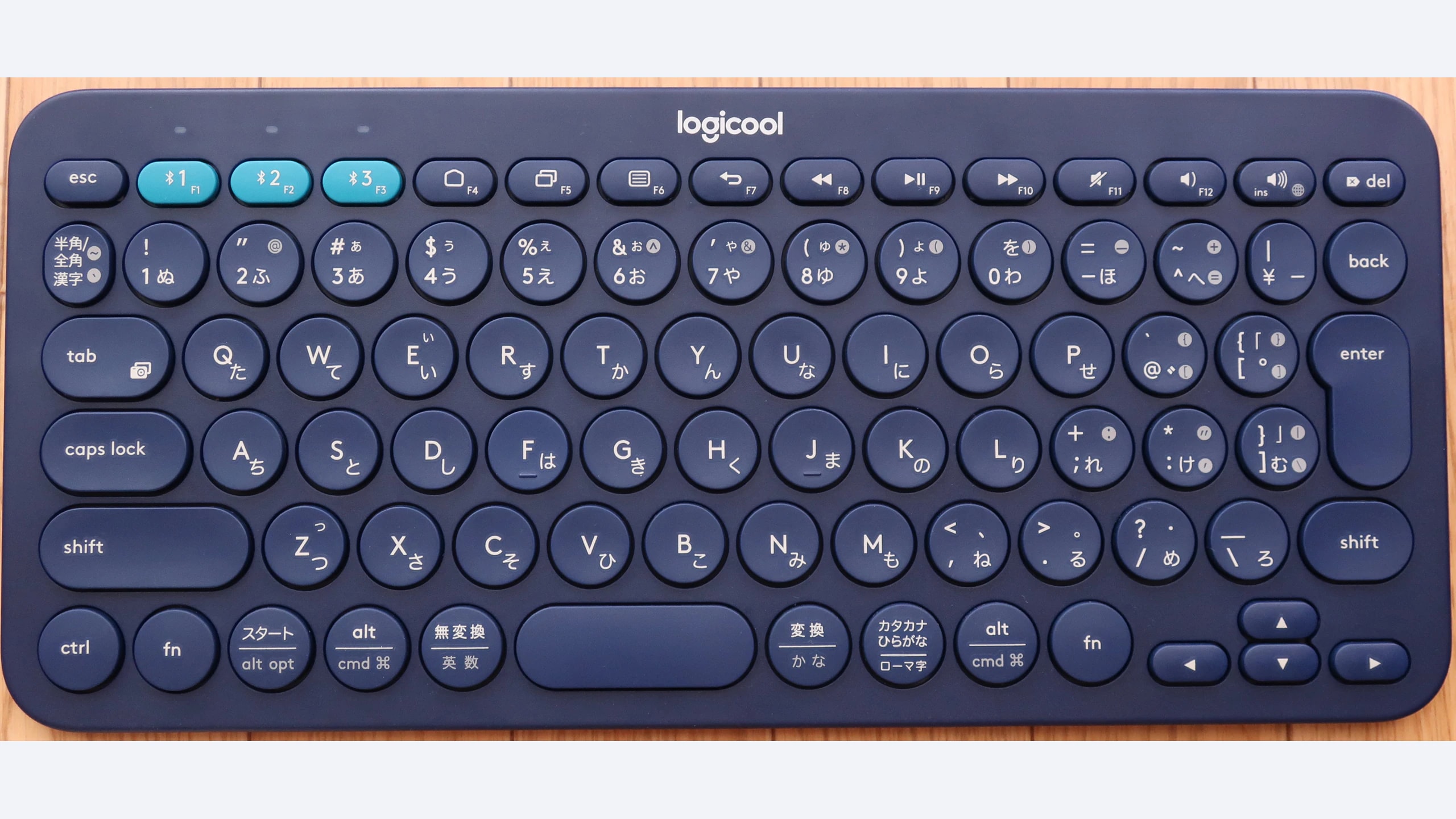
A keyboard shared between a desktop, laptop and tablet needs more than a Bluetooth logo. The layout must fit your work, switching must be understandable, and the keys should suit your typing style. The Logitech K380, Keychron K3 (Version 2) and Razer Pro Type address that problem with three distinct designs: compact scissor keys, a slim mechanical 75% board and a full-size tactile mechanical keyboard. Their differences are useful precisely because they do not recreate the same desk.
This guide concerns established generations checked on October 23, 2026, rather than the newest names in each family. The K380 is not the K380s; the Keychron is Version 2; the Razer is the original Pro Type with Orange switches, not Ultra or Ergo. No current local price or stock claim is assumed.
Research disclosure: GearTrio Editorial has not hands-on tested these devices. This is original desk-research synthesis of manufacturer specifications and the independently published RTINGS tests linked beside the relevant claims. Manufacturer claims, reviewer findings and our conditional editorial recommendations are identified separately.
Start with the keys you use every day
If you mostly write messages and occasionally enter numbers, a compact board can make a shared workspace easier to arrange. Frequent spreadsheet entry can justify a dedicated number pad. A function row and accessible arrows matter to coding and editing workflows, but having them does not require a full-width keyboard. Work through your normal shortcuts before deciding that a smaller layout is an automatic improvement.
These products also differ in what a cable can do. The Keychron supports wired input, the K380 uses Bluetooth alone, and the original Pro Type’s USB-C port is specified for charging. Do not infer a wired fallback simply from a photograph of a charging socket. That distinction matters when Bluetooth is unavailable or a corporate computer restricts pairing.
| Product | Manufacturer | Declared features / practical fit |
|---|---|---|
| Logitech K380 | Logitech | Compact scissor keys; three Bluetooth hosts; AAA cells; no backlight |
| Keychron K3 (Version 2) | Keychron | 75% low-profile optical Brown review; three Bluetooth hosts/USB-C data |
| Razer Pro Type | Razer | Full-size Orange tactile switches; receiver/three Bluetooth hosts; USB-C charging only |
Logitech K380
Logitech’s K380 datasheet lists a compact 279 × 124 × 16 mm design, 423 g mass and switching among three paired devices. It uses scissor-style keys and replaceable AAA batteries. There is no backlight, receiver or USB data mode to add later through software. Its appeal is straightforward Bluetooth typing in a small footprint.
RTINGS’ K380 review found light, quiet typing and good portability, alongside limited customization and unsuitability for latency-sensitive gaming. Those observations make it a useful reference point for someone who wants a work keyboard rather than a platform for changing switches. Its round keycaps may still take an individual typist time to get used to.
Our editorial fit is a laptop-and-tablet routine where a number pad is unnecessary and spare cells are easier than a charging schedule. Check the exact regional layout: the feature photo shows a Japanese Logicool version, whose legends and key arrangement differ from a US model. Logicool is regional Logitech branding, not another manufacturer. A familiar model name alone does not confirm the Enter key, modifier labels or character positions you need. If you type regularly in low light, accept the lack of illumination before buying rather than expecting a software update to solve it. Also confirm that the target device supports the required Bluetooth keyboard functions.
Keychron K3 (Version 2)
The K3 Version 2 specification describes a 306 × 116 mm low-profile board around 483 g, with Bluetooth pairing for three devices and USB-C wired operation. Its compact 75% layout retains arrows and a function row. The optical hot-swappable version uses compatible low-profile optical switches; this is not a promise of compatibility with ordinary full-height mechanical replacements.
RTINGS tested the optical Brown version and found a well-built, comfortable low-profile design. It also described sensitive short pre-travel and a somewhat dull keypress feel. Its quietness observations apply to that switch sample, not every Gateron or optical choice available under the K3 name. The review found no companion software for macros or remapping.
We would shortlist it when you need a transportable mechanical board and a real wired fallback. Be exact about the version in a seller’s description: the official page now separately promotes newer generations, which does not upgrade an older unit’s firmware features. Check the OS switch position and the supplied Mac/Windows keycaps when moving between computers. A low front edge can reduce the need for a tall wrist support, but comfort is individual. Think carefully before selecting very short travel if you tend to rest heavily on the keys; a light switch can be convenient while still making accidental input more likely for your technique.
Razer Pro Type
Razer specifies the original RZ03-03070 as a full-size Orange-switch keyboard with white lighting, receiver operation and three Bluetooth host slots. Its declared dimensions are 442 × 133 × 39 mm and mass is 900 g. The USB-C socket is identified as charging-only, so keep the receiver if you need an alternative to Bluetooth input.
RTINGS’ Pro Type test found a light, tactile typing experience and useful multi-device connectivity, while criticizing the missing wrist rest and limited portability. Its customization depends on Windows software. The review refers to the software available during testing; current support documentation lists a newer Synapse generation. Verify current device support rather than installing software solely because a historical review names it.
The main reason to choose it is a stationary desk that genuinely uses a number pad and benefits from a receiver connection. That is a different need from carrying a keyboard with a tablet. White backlighting is useful if you need illuminated legends, but it does not make the board an RGB customization platform. Razer’s declared runtime changes dramatically with lighting enabled, so plan a charging routine around your own settings instead of treating the longest lights-off figure as a promise. Measure desk space with the mouse in position, and allow room for a separate wrist rest if your typing posture calls for one.
How to choose for several devices
Separate pairing from simultaneous use. Remembering several hosts means you can switch among them; it does not mean every keystroke is sent to all hosts at once. Put your main computer on the connection you expect to use daily, assign the other slots consistently and check the switching shortcut before working on a sensitive document. Confirm which host is active before entering passwords or messages.
Check the complete layout. Photograph or list the shortcuts you use most often. Look at Delete, Home, End, function keys and the modifiers needed by your operating system. A compact keyboard saves space only if its layers do not make your everyday tasks unnecessarily awkward. Conversely, a full-size board may consume valuable mouse space even if its number pad is rarely touched.
Decide how much customization you actually need. The K380 offers limited preset customization; the K3 Version 2 lacks its own remapping application; the Pro Type’s deeper configuration needs supported Windows software. On a locked-down work machine, useful default behavior can matter more than a large programmable feature list. Do not assume a macro created on one host is available on every other device.
Plan power and support. Replaceable cells suit some routines, while rechargeable keyboards suit others. Keychron’s published warranty generally states twelve months unless purchase documents say otherwise, with exclusions and proof requirements. A used board or a foreign-layout import needs its own seller and coverage check. We have not verified an individual offer’s eligibility or converted advertised maximum battery life into measured working days.
The practical choice
Choose the Logitech K380 for quiet, compact Bluetooth work with replaceable batteries; the Keychron K3 (Version 2) for a slim mechanical layout with wired fallback; or the Razer Pro Type for a full-size, receiver-capable stationary setup. The deciding factor is your combination of layout, power and host restrictions, not a universal ranking of switch technologies. If you instead want a conventional TKL mechanical layout, our existing three-brand TKL comparison addresses that separate tradeoff.
Featured photograph: Only Logitech K380 is pictured; the other two compared models are not shown. Japanese Logicool K380 layout; not the US layout used for most measurements. Photo: Darklanlan, via Wikimedia Commons original source, CC BY 4.0. Resized and encoded as WebP; neutral padding to 16:9 where needed; embedded metadata removed. No device retouching or upscaling. No photographer endorsement is implied.
