A full-size wireless mechanical keyboard can serve two very different desks: one built around long typing sessions and several computers, or one where fast receiver input and programmable commands come first. The Keychron K10, Logitech G613 LIGHTSPEED and Razer BlackWidow V3 Pro span those priorities. The important differences are their connection modes, battery maintenance, layout footprint and exact switches, rather than the fact that all three are mechanical.
These are established generations, checked on October 23, 2026. The K10 here is the original model, not Pro, Max or Version 2. The G613 uses Romer-G Tactile switches, and the cited BlackWidow test used Green clicky switches. A later name or different switch cannot inherit the same review findings. We have not verified current local offers or assigned a price winner.
Research disclosure: GearTrio Editorial has not hands-on tested these devices. This is original desk-research synthesis of manufacturer specifications and the independently published RTINGS tests linked beside the relevant claims. Manufacturer claims, reviewer findings and our conditional editorial recommendations are identified separately.
Full-size means keeping the number pad
A dedicated number pad is useful when your day includes numeric entry, but it also pushes the mouse farther from the center of the keyboard. Measure the complete desk arrangement before deciding. The G613 adds a macro column and a fixed wrist rest, while the Razer includes a detachable rest. The Keychron keeps a more conventional arrangement without dedicated macro software.
Wireless is equally specific. Bluetooth can help a shared work setup, while a dedicated receiver provides another input path for gaming. The K10 has Bluetooth and wired USB input but no dedicated gaming receiver. The G613 has receiver and Bluetooth operation but no wired data fallback. The BlackWidow offers receiver, Bluetooth and wired USB-C operation. Those differences should shape the shortlist before lighting effects or switch branding.
| Product | Manufacturer | Declared features / practical fit |
|---|---|---|
| Keychron K10 | Keychron | Full-size; Bluetooth/USB-C data; optional hot-swap; no receiver |
| Logitech G613 LIGHTSPEED | Logitech | Full-size plus macro column; receiver/Bluetooth; two AA; fixed rest |
| Razer BlackWidow V3 Pro | Razer | Full-size; receiver/Bluetooth/USB-C data; Green review; detachable rest |
Keychron K10
Keychron’s original K10 information describes a full-size layout, Bluetooth pairing for three devices and USB-C wired input. Case choice affects both footprint and mass: the manufacturer lists approximately 895 g for plastic and 1,082 g with the aluminum frame. Hot-swap capability is a selected variant, not something to assume from the model name alone.
RTINGS tested a Gateron Brown K10 and found good typing quality and useful Mac/Windows compatibility, but latency that limits its appeal for competitive play. It also notes the lack of dedicated software for macro or lighting customization. The current official page offers refreshed switch options, so the Brown sample’s feel must not be transferred to a newer switch simply because the case looks similar.
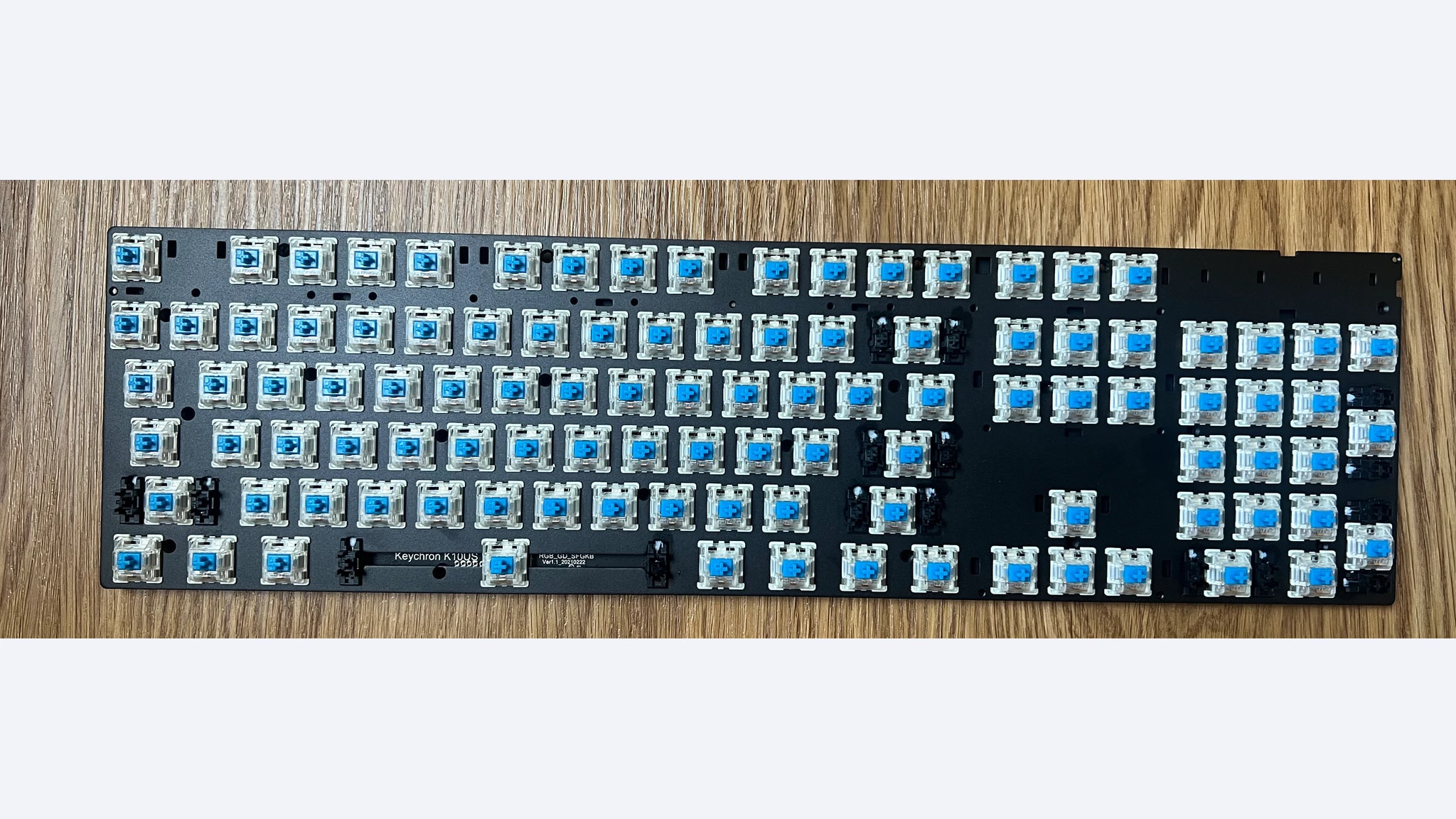
Our editorial fit is a typing-first desktop shared with a laptop or tablet, especially when you want familiar full-size key placement and the option of a cable. Check the OS switch and keycaps before moving between platforms. The feature photograph is an explicitly disassembled K10 board with blue switches, not the assembled Brown-switch review unit or the package you receive from a retailer. It illustrates the model’s internal board, not evidence that every version is hot-swappable or user-serviceable in the same way. Choose a complete, specified variant rather than planning modifications from a photograph. A wrist rest is an additional fit decision, not an included feature to assume.
Logitech G613 LIGHTSPEED
Logitech’s original G613 announcement specifies LIGHTSPEED receiver operation, Bluetooth, six programmable G-keys and two AA batteries. Its claim of up to eighteen months depends on usage conditions and is not a GearTrio endurance result. This is a 2017 design: its age is part of the buying context rather than a reason to describe an old launch price as today’s bargain.
RTINGS’ G613 LIGHTSPEED review found low latency and useful dedicated macro keys, but described the short-travel Romer-G Tactile feel as potentially mushy and sensitive for typing. The fixed wrist rest makes the board bulky, and there is no backlighting. Those tradeoffs remain important even if a wireless receiver and macro column sound attractive.
Our reason to shortlist it is a desk that needs dedicated command keys and prefers replaceable cells to routine charging. Keep spare batteries and verify that the correct receiver is included. A USB cable cannot rescue an incomplete wireless package because there is no wired input mode. Inspect an older unit’s keys and battery compartment during the seller’s return window, and remember that proprietary Romer-G parts are a different maintenance proposition from common cross-stem switches. A comfortable fixed rest for one person may be an obstacle for another, especially if you want to move the keyboard closer to the desk edge. Check that configuration software still supports your actual system before depending on macros.
Razer BlackWidow V3 Pro
Razer’s RZ03-03530 support sheet identifies receiver, Bluetooth and USB-C input, doubleshot ABS keycaps, media controls and a detachable wrist rest. Green clicky and Yellow linear versions exist. Its battery specifications change sharply with lighting; for example, the stated maximum with lighting off is not comparable to a high-brightness illuminated session.
RTINGS’ Green-switch BlackWidow V3 Pro test praises low latency, programmable controls and the included wrist rest, but reports inconsistent sound and feel among the clicky switches on its sample. We retain that criticism rather than treating lighting and wireless flexibility as a complete verdict. The observation does not establish how a Yellow-switch unit sounds or feels.
We would consider this model for someone who wants one full-size board to handle receiver gaming, Bluetooth use and wired operation, with illuminated legends and media controls. The price of that flexibility is a more complex power and software routine than a basic typing board. Decide whether you actually want clicky switches in a shared room before choosing Green. If choosing Yellow instead, read a test of that exact variant for acoustic and feel expectations. Current support documentation names a newer Synapse generation than the review, so verify supported software rather than assuming that every old configuration guide remains current. Also measure your setup with the wrist rest attached; dimensions quoted with unclear accessory scope are not a reliable bare-board comparison.
Pick a connection and power routine first
For a typing-led multi-device desk, decide how often you switch hosts and whether Bluetooth is permitted on each one. The K10 can be useful without a vendor application for ordinary input, but it does not become a receiver keyboard through a firmware update. Its wired option is the straightforward fallback when wireless pairing is inconvenient. Check startup and login requirements separately if your work computer uses pre-boot security.
For receiver gaming, consider the G613’s dedicated command column against the BlackWidow’s broader programmable layout and lighting. The G613’s no-backlight design can suit a lit room but is a real limitation at night. The Razer’s illuminated controls can help visibility while adding charging frequency. Neither feature makes switch feel or key placement irrelevant during ordinary work.
For maintenance, separate replaceable batteries from replaceable switches. Swapping AA cells in the G613 is not the same as maintaining its proprietary key mechanism. A K10 listing must explicitly identify hot-swap support if that is part of your plan. The disassembled photograph does not authorize assuming every unit has socketed switches. Look for exact case, switch and layout details rather than a family-level stock image.
For total cost, include missing receivers, cables, regional layout, a possible wrist rest and seller coverage. Keychron’s general published warranty is twelve months unless purchase documents specify otherwise; that does not settle the position of an imported or used offer. We do not promise warranty eligibility or new battery capacity for older marketplace hardware. Ask for the actual package contents and proof of purchase before treating a low asking price as good value.
Which full-size board fits?
Choose the Keychron K10 for a conventional typing layout, multi-device Bluetooth and wired fallback. Consider the Logitech G613 LIGHTSPEED when its macro column, receiver and replaceable AA cells matter more than backlighting and desk size. Choose the Razer BlackWidow V3 Pro when three input modes, lighting and a detachable rest match your routine, with the switch caveat understood. For a different priority centered on wired customization and media controls, see our existing full-size wired keyboard comparison.
Featured photograph: Only Keychron K10 is pictured; the other two compared models are not shown. Disassembled original K10 board with blue switches, housing and all keycaps removed; not the assembled Brown-switch review unit. Photo: Fastily, via Wikimedia Commons original source, CC BY-SA 4.0. Resized and encoded as WebP; neutral padding to 16:9 where needed; embedded metadata removed. No device retouching or upscaling. This adaptation remains under CC BY-SA 4.0. No photographer endorsement is implied.
