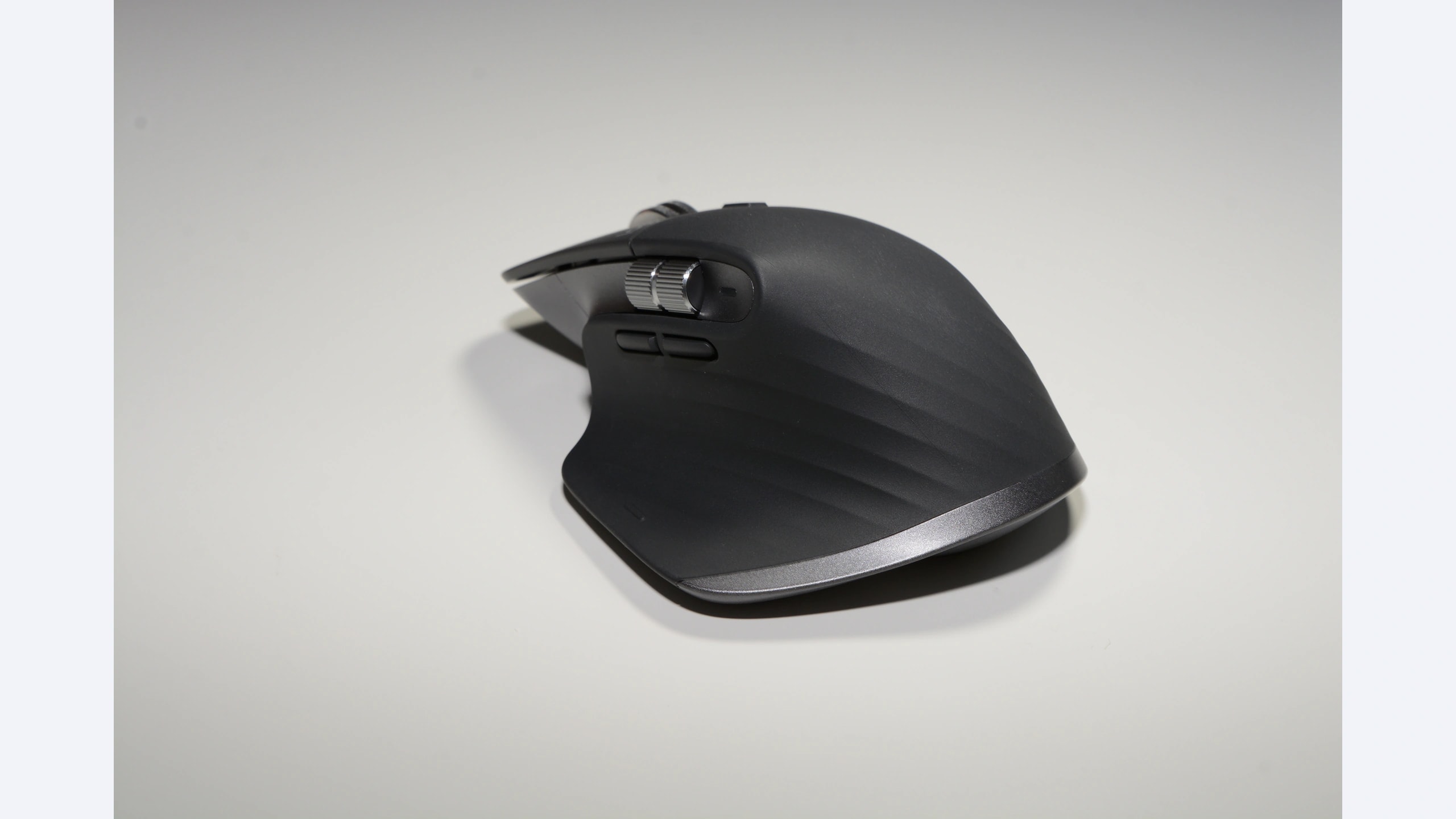
Switching between a work computer and a personal laptop exposes differences that a gaming specification sheet can hide. Do you want separate horizontal scrolling, a supportive thumb rest, or batteries you can replace in seconds? The Logitech MX Master 3S, Razer Pro Click and SteelSeries Rival 3 Wireless offer three different answers. All support Bluetooth and a dedicated wireless receiver, but their controls, charging arrangements and software requirements are far from interchangeable.
These are established models, researched on October 23, 2026. The Pro Click is the original RZ01-02990 and the Rival is the original wireless generation. We are not silently substituting newer revisions. No current regional price or stock claim has been verified for this comparison.
Research disclosure: GearTrio Editorial has not hands-on tested these devices. This is original desk-research synthesis of manufacturer specifications and the independently published RTINGS tests linked beside the relevant claims. Manufacturer claims, reviewer findings and our conditional editorial recommendations are identified separately.
A work mouse should match the work
A spreadsheet-heavy day rewards different features from a day spent mostly clicking through a browser. Horizontal navigation can be a daily convenience or a rarely used extra. Likewise, multi-device pairing is only useful when switching is understandable and the computer permits the software you need. Write down your three most frequent actions before selecting a mouse, and decide which ones really belong under your thumb.
The comparison below combines declared specifications with attributed hands-on observations. It does not turn an ergonomic marketing claim into a medical recommendation. A supportive shape can still be the wrong size for your hand, and discomfort should not be dismissed because a product is sold for productivity.
| Product | Manufacturer | Declared features / practical fit |
|---|---|---|
| Logitech MX Master 3S | Logitech | 141 g declared; dual wheels; Bluetooth/Bolt; check receiver bundle |
| Razer Pro Click | Razer | 106 g without cable declared; tilt wheel; four hosts; Micro-USB |
| SteelSeries Rival 3 Wireless | SteelSeries | 106 g two AAA /96 g one AAA declared; receiver/Bluetooth; basic wheel |
Logitech MX Master 3S
Logitech’s MX Master 3S information describes an 8,000-DPI sensor, quiet primary clicks and the MagSpeed wheel. Its declared dimensions are 124.9 × 84.3 × 51 mm and mass is 141 g. The thumb wheel is the defining difference for people who repeatedly move across wide worksheets or editing timelines.
RTINGS’ MX Master 3S test praises the construction, quiet clicks and productivity controls, while highlighting the bulk, limited small-hand suitability and gaming-performance compromises. We would read those findings as support for a stationary work setup, rather than as evidence that every desk worker needs this shape. It is substantial equipment to carry around with a laptop.
There is an important packaging qualification. The original standard bundle reviewed by RTINGS includes a Logi Bolt receiver, but the current US product page defaults to a Bluetooth Edition. Check the exact package before assuming the receiver is included. USB-C is for charging, not wired pointer input, and the older Unifying receiver is not a substitute for Bolt. Options+ provides advanced customization on supported Windows and macOS systems; basic connectivity on another platform does not promise the same software features. Our editorial preference for it depends on actually using the wheel functions and finding the thumb-rest shape comfortable.
Razer Pro Click
Razer’s original Pro Click support page specifies 106 g without cable, dimensions of 126.7 × 79.7 × 45.7 mm and wired, receiver and Bluetooth modes. It supports up to four host connections. The wheel provides tilt inputs for horizontal actions, giving it a different approach from the dedicated side wheel on the Logitech.
RTINGS’ Pro Click review found a comfortable, sturdy right-handed design and responsive performance. It also notes that the wheel does not unlock for free scrolling and that customization software is unavailable on macOS. Those limits are important if you expect one device to behave identically on both a Windows desktop and a Mac laptop.
The original model uses Micro-USB. On an older or incomplete listing, verify the included charging cable and connector fit instead of assuming any cable housing will clear the recess. Razer advertises different maximum runtimes for Bluetooth and receiver use; we do not treat those numbers as a head-to-head battery test. This is our more natural shortlist candidate for someone who wants a supportive right-handed shell and tilt scrolling without committing to the MX wheel arrangement. It is still a full-size desk mouse, not an especially compact travel accessory. Razer’s collaboration with Humanscale is design background, not proof that this device will relieve an individual user’s pain.
SteelSeries Rival 3 Wireless
The original Rival 3 Wireless specification describes receiver and Bluetooth operation using replaceable AAA batteries. SteelSeries lists 106 g with two batteries or 96 g with one. The body is approximately 120.6 mm long, 67 mm wide at the rear and 37.9 mm high. Battery configuration is therefore part of the mass specification, not a minor footnote.
RTINGS’ Rival 3 Wireless test found a well-built shell, but relatively substantial weight and less impressive click latency than some gaming alternatives. Its wheel has neither tilt controls nor a free-scroll mode. The review’s comfort observations concern its own sample and users’ grip fit, not an assurance that a symmetrical shape supports the hand like a sculpted thumb rest.
Our reason to consider it for work is practical battery independence. Someone who dislikes connecting a charging lead may prefer keeping spare cells in a drawer. In return, you accept battery handling and a simpler scrolling system. One cell can reduce mass, but we have no controlled test showing how much runtime your workload would sacrifice. There is no wired data fallback. Receiver storage is useful when moving between locations, provided the actual used package still contains the receiver. Do not buy a Gen 2 listing expecting every observation about this original generation to transfer automatically.
Decide how you will switch computers
First, check the computers themselves. Does a managed work laptop allow Bluetooth pairing and third-party configuration software? Is its available USB port the right type for the supplied receiver? A mouse can connect successfully while an app-specific shortcut remains unavailable. If you cannot install software, identify the useful default controls before paying for customization you cannot access.
Second, consider switching frequency. A person moving between hosts every few minutes should examine the location of the switching control, rather than treating a maximum host count as a measure of convenience. If switching would require lifting the mouse, decide whether that interrupts your actual workflow. Keep each host’s pointer settings consistent enough that changing computers does not become an unexpected sensitivity change.
Third, decide what scrolling problem you want to solve. A separate thumb wheel can be valuable in large documents, while tilt actions may be sufficient for occasional horizontal movement. The Rival’s simpler wheel can be entirely adequate for ordinary page navigation. Avoid adding software macros just to recreate a feature you could have selected directly, unless the software is available and dependable on all intended hosts.
Finally, account for maintenance and coverage. A rechargeable model reduces loose-cell handling but depends on battery condition and a usable charging connection. The consumer MX page lists a one-year US limited hardware warranty; business editions and other regions can differ. For older Razer and SteelSeries offers, verify seller status, proof-of-purchase requirements and missing accessories directly. We have not established warranty eligibility for a hypothetical marketplace unit.
Our conditional recommendation
Choose the Logitech MX Master 3S if dual scrolling and quiet clicks solve daily work problems and its size fits. Consider the Razer Pro Click for its supportive shape, tilt wheel and additional host capacity, with the original cable and Windows customization limitations understood. Choose the SteelSeries Rival 3 Wireless when replaceable batteries and straightforward controls matter more than advanced scrolling. None becomes the best work mouse simply by having the largest sensitivity range. For a different, travel-focused tradeoff, see our compact battery-powered mouse comparison.
Featured photograph: Only Logitech MX Master 3S is pictured; the other two compared models are not shown. Graphite standard MX Master 3S, side view. Photo: Hayden Schiff, via Wikimedia Commons original source, CC BY 4.0. Resized and encoded as WebP; neutral padding to 16:9 where needed; embedded metadata removed. No device retouching or upscaling. No photographer endorsement is implied.
