A command-heavy keyboard is useful when it makes an action easier to find. A separate macro column can keep shortcuts away from ordinary typing keys, while a programmable standard layout can save width. The decision becomes more complicated when stored profiles, background software, wrist rests and passthrough cables enter the picture. “Programmable” does not mean that every function travels with the keyboard.
The Logitech G910 Orion Spectrum, Razer BlackWidow Elite and Corsair K95 RGB PLATINUM are three established wired designs with different answers. Logitech supplies nine dedicated G-keys; Corsair uses six; Razer makes the standard keys programmable without adding a separate macro bank. These are older generations, useful for evaluating existing setups and clearly identified offers. They are not the latest keyboards, and current regional prices or stock were not verified on October 24, 2026.
Research disclosure: GearTrio Editorial has not hands-on tested these devices. This is original desk-research synthesis of manufacturer documentation and the independently published hands-on reviews linked beside the relevant claims. Manufacturer specifications, attributed reviewer observations and our conditional editorial recommendations are separated. We do not combine different test methods into a numerical ranking.
Map your commands before choosing the extra keys
Make a short list of actions that genuinely deserve a dedicated position. Separate frequent shortcuts from occasional sequences, then decide whether you need them available while typing normally. A macro column is easier to justify when you want identifiable keys that do not replace letters or function keys. Software layers can avoid extra width, but require remembering which layer and application profile are active.
Also distinguish recording from playback. A keyboard may store some settings while requiring software for recording, application switching or particular actions. If you move between computers or use a managed machine, confirm your exact workflow rather than relying on an advertised memory capacity. Layout and switch variant matter just as much: the three review samples here do not use the same switch type.
| Product | Manufacturer | Documented design / practical fit |
|---|---|---|
| Logitech G910 Orion Spectrum | Logitech | Nine dedicated G-keys; Romer-G tactile; volume wheel; no USB passthrough |
| Razer BlackWidow Elite | Razer | Programmable standard keys; Orange review sample; USB/audio passthrough; no macro bank |
| Corsair K95 RGB PLATINUM | Corsair | Six macro keys; MX Speed review sample; hardware profiles; USB passthrough |
Logitech G910 Orion Spectrum
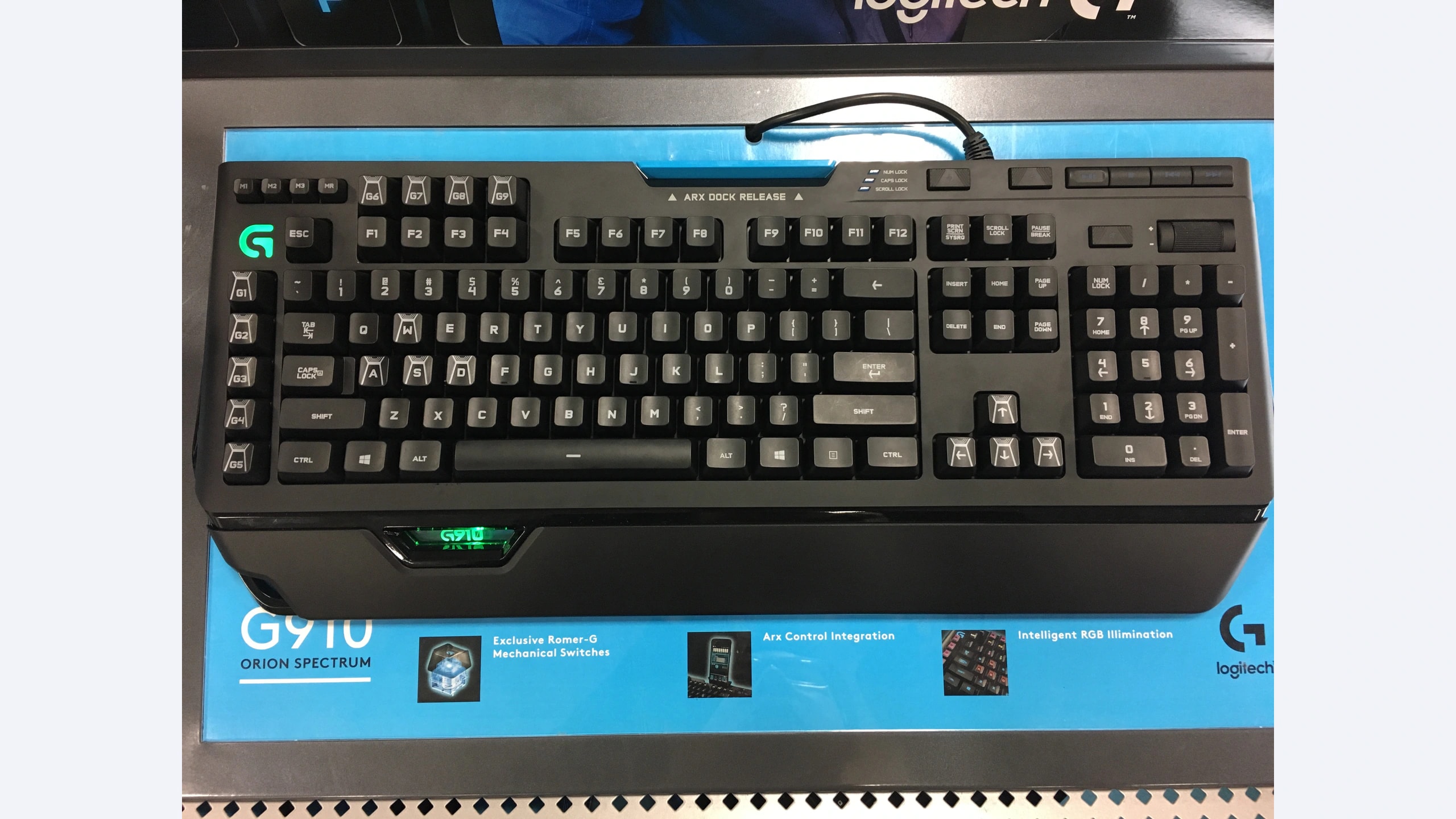
The Spectrum is the G910 version with revised standard-shaped keycaps, rather than the earlier Spark’s distinctive caps. Logitech’s exact Spectrum specifications list nine G-keys, three mode keys, a recording key and dedicated media controls with a volume wheel. At 505 mm wide, it needs considerable desk space. The support sheet also confirms that it has no built-in USB passthrough port.
In his OC3D hands-on Spectrum review, Bryan Waters valued the extensive controls and lighting options, while criticizing the plastic phone tray, wrist rest and aspects of rigidity. We use those model-specific observations without transferring the Spark’s keycap-related typing findings to the Spectrum. Its phone dock is physical hardware, not proof that the original Arx software still works with a current phone.
Our editorial reason to choose the Spectrum is direct access to a large dedicated command bank. Arrange the most important actions where your hand can reach them without searching, then check the upper G-keys as well as the left column. The extra width is harder to justify if those positions will remain unused. Its release-era documentation names Logitech Gaming Software and older Windows versions; confirm present configuration support before relying on a legacy keyboard for a new workstation. Do not treat historical app integration as a current compatibility guarantee.
Razer BlackWidow Elite
The BlackWidow Elite takes a different route: its normal keys can be remapped, but there is no added macro column. Razer’s RZ03-0262x support page documents the media dial, detachable wrist rest and USB/audio passthrough. It lists a 448 mm keyboard width, with depth increasing when the rest is attached. Orange, Green and Yellow switch versions are separate typing choices within the model family.
RTINGS’ hands-on review used Orange tactile switches. It found sturdy construction, a useful included rest and light, responsive key operation. That evidence does not describe the click sound of Green switches or the feel of Yellow linear switches. Treat those as variants requiring their own assessment, not interchangeable purchases.
We would favor the Elite when you want configurable shortcuts and passthrough facilities without committing to a wider macro bank. Decide which ordinary keys or layers you can repurpose without disrupting your work. The current official page names Synapse 4, while the review describes Synapse 3. It also states that on-the-fly macro recording requires Synapse to be installed and running. That is an important distinction for a computer where background software is restricted. Verify the exact actions that remain available when software is closed before depending on profiles across multiple hosts.
Corsair K95 RGB PLATINUM
The original K95 RGB PLATINUM supplies six dedicated macro keys, media controls, a volume roller and USB passthrough. The selected North American MX Speed product page lists 8 MB of onboard storage and three profiles. This is the original PLATINUM, not the XT. Regional layout tables and later revisions should not be mixed when checking memory, keycaps or switch availability.
RTINGS’ original K95 PLATINUM test used Cherry MX Speed linear switches. The reviewer found a sturdy keyboard with responsive, light actuation and useful dedicated controls, but criticized the feel of its ABS keycaps. Those short-travel switch observations should not be applied to a Brown-switch version, and the original model does not inherit the XT’s PBT keycaps.
Our recommendation is to consider the K95 when a separate macro column and stored hardware playback are central to your workflow. Test your intended actions on the destination computer with iCUE closed; a storage specification alone does not prove that every software action is portable. Allow room for the detachable wrist rest and route both USB connections deliberately if using passthrough. A used listing should identify the exact switch, regional layout and original versus XT generation. Those details can change the typing experience more than the shared K95 name suggests.
Profile portability, desk width and switch choice
For a fixed gaming desktop, background software may be a manageable requirement. For a keyboard that moves between computers, ask a more concrete question: can the exact shortcut you need be triggered on a host that has never had the software installed? Try simple remaps, a recorded sequence and any application-specific command separately. They need not behave identically. These are checks for your own setup, not tests performed by GearTrio.
Choose the G910’s layout if the nine dedicated positions have a clear purpose and its width fits. Choose the Elite’s approach if you want to retain a more conventional full-size footprint and can organize assignments through normal keys or layers. Choose the K95 if six separate macro keys and hardware profile playback solve the problem. Our recommendation follows those documented differences rather than assigning an artificial overall score.
Measure the desk with your mouse in its normal position. A keyboard’s width affects where the mouse can sit, while an attached rest changes how much depth you need. Compare bare-keyboard and with-rest dimensions separately; do not add specifications from different variants into one idealized device. Similarly, the weight of an assembled keyboard with its rest and cable is not directly comparable with a bare-board measurement.
Switch choice deserves a separate decision. The G910 uses proprietary Romer-G tactile switches, the cited Elite sample uses Razer Orange tactile switches, and the cited K95 sample uses Cherry MX Speed linear switches. Their mechanisms and replacement-part ecosystems differ. None of these original boards should be assumed to offer modern hot-swap switch replacement. If you want to change switches routinely, a different keyboard category may be more appropriate.
Before buying older hardware, inspect every key, macro position, media control, rest attachment and passthrough port. Confirm that the seller includes the rest and any promised alternate caps. Check current software support, regional layout and warranty eligibility for the actual purchase. Corsair and Razer list two-year coverage in the relevant product/general policies, subject to their conditions; that is not a promise of fresh coverage for a used keyboard.
Choose the command arrangement you will actually use
The G910 Orion Spectrum is the candidate for a large dedicated command bank, the BlackWidow Elite for configurable standard keys with passthrough and a detachable rest, and the original K95 RGB PLATINUM for a smaller macro column with documented hardware storage. The best fit depends on where your shortcuts live and which software restrictions apply to your computers.
Our existing full-size mechanical keyboard comparison addresses a broader typing and customization brief. If the cable itself is the issue, see the full-size wireless comparison. For this trio, begin with a real command list, verify profile behavior and only then decide how much keyboard you need.
Featured photograph: Only Logitech G910 Orion Spectrum is pictured; the other two compared models are not shown. UK ISO-layout Orion Spectrum exhibition sample with the wrist rest attached; the displayed model label identifies Spectrum rather than Spark. Photo: Fastily, via Wikimedia Commons original source; CC BY-SA 4.0. Resized with neutral padding where needed to a 16:9 canvas and encoded as WebP; embedded metadata removed. No additional device cropping, retouching, generated detail or upscaling. This adaptation remains under CC BY-SA 4.0. No photographer endorsement is implied.
