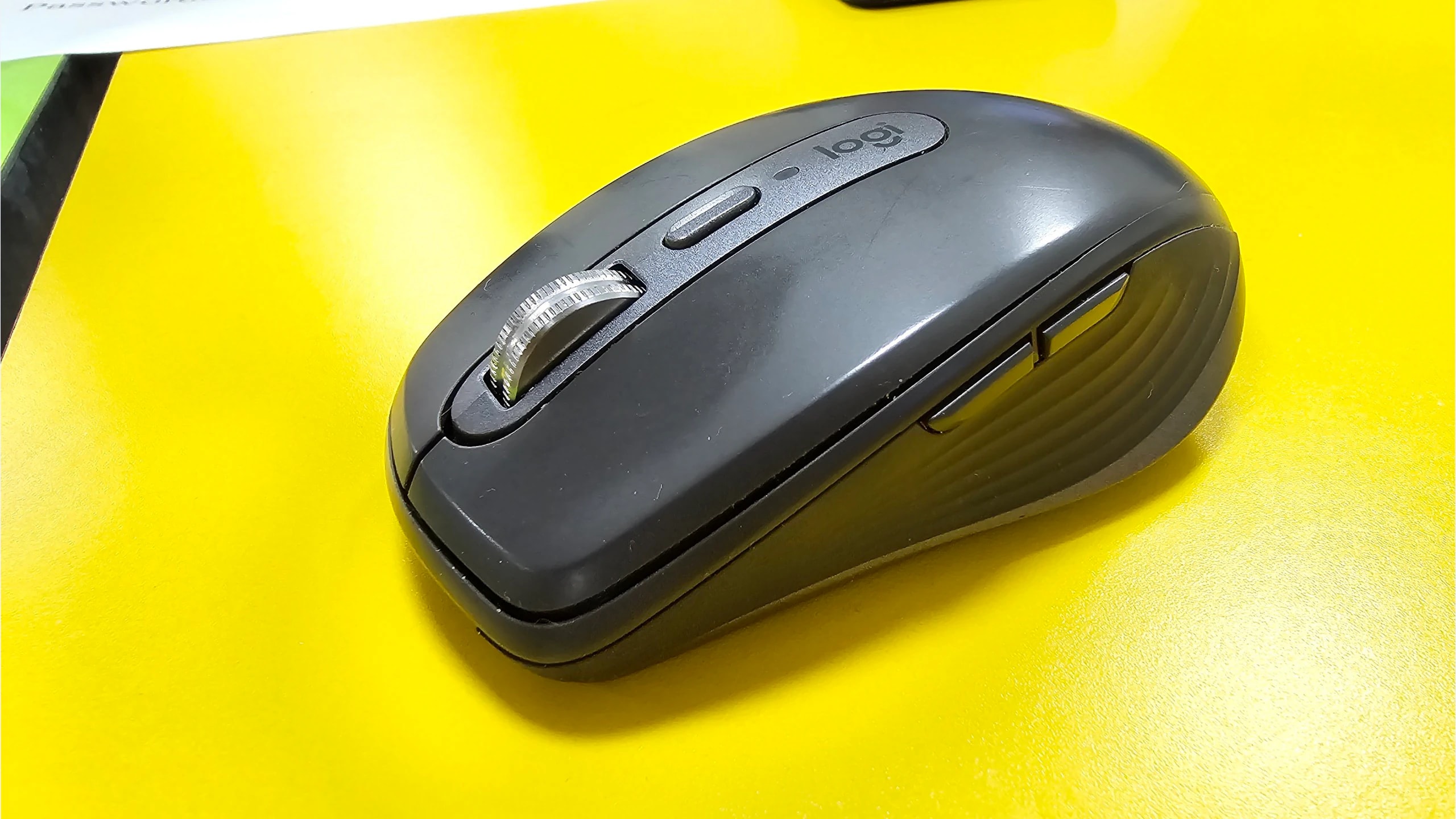
A travel mouse should make a temporary workspace easier to use. That might mean moving through a long document quickly, navigating a spreadsheet horizontally, or taking the same laptop from work to an evening game. Small size alone does not settle the choice: the receiver can be easy to lose, a compact shell can lack palm support, and a charging socket may not carry pointer data.
The Logitech MX Anywhere 3, Razer Pro Click Mini and Corsair HARPOON RGB WIRELESS address different parts of that brief. The Logitech emphasizes scrolling in a rechargeable compact body; the Razer adds a tilt wheel and replaceable batteries; the Corsair brings a gaming-oriented connection choice. We compare the original models named here, not their similarly named successors. These are established generations, and current regional prices or stock were not verified on October 24, 2026.
Research disclosure: GearTrio Editorial has not hands-on tested these devices. This is original desk-research synthesis of manufacturer documentation and the independently published hands-on reviews linked beside the relevant claims. Manufacturer specifications, attributed reviewer observations and our conditional editorial recommendations are separated. We do not combine different test methods into a numerical ranking.
Decide what you need away from your main desk
For reading and office work, a wheel that can run freely saves repeated finger movements through long pages. Horizontal navigation is a separate function: a wheel may tilt, or software may combine a side button with wheel movement. That distinction matters if you switch between computers on which you cannot install configuration software.
For gaming, look at the connection used in the actual independent test. A favorable receiver result does not establish equivalent Bluetooth behavior. For travel, think about the complete kit: mouse, receiver, any USB adapter and the appropriate charging cable or spare battery. A mouse with no receiver compartment needs a separate place in your bag, even if its body is exceptionally compact.
| Product | Manufacturer | Documented design / practical fit |
|---|---|---|
| Logitech MX Anywhere 3 | Logitech | Original consumer model; Unifying/Bluetooth; USB-C charging; no receiver compartment |
| Razer Pro Click Mini | Razer | Bluetooth/receiver; tilt and free-spin wheel; receiver storage; one or two AA |
| Corsair HARPOON RGB WIRELESS | Corsair | Receiver/Bluetooth/wired data; rechargeable; conventional wheel; gaming-oriented |
Logitech MX Anywhere 3
The original consumer MX Anywhere 3 pairs its MagSpeed wheel with Bluetooth and Unifying connectivity. Logitech’s original announcement confirms three-device switching and USB-C charging. Keep the original consumer package separate from the Bolt-based Business version and the newer 3S. The charging cable is not a substitute for a working wireless connection, which matters if Bluetooth is unavailable and the receiver has been left at home.
RTINGS’ hands-on review found a sturdy and portable mouse, but highlighted the missing receiver-storage slot. It favored the compact shape for fingertip use and cautioned that it could feel too small for palm or claw users. The review also describes horizontal scrolling despite the absence of a separate thumb wheel.
Our recommendation is to consider it for document-heavy travel when you value a rechargeable mouse and can manage the receiver separately. Before relying on its horizontal navigation, confirm that the required button-and-wheel behavior works in your applications with your permitted software setup. The ordinary 2020 consumer model uses Unifying, so buying a Bolt receiver solely because another MX product uses it would be a mistake. Check the bottom markings and exact bundle. A used rechargeable mouse also deserves a battery-condition check; the manufacturer’s original runtime claim does not describe the capacity of an aged battery.
Razer Pro Click Mini
The Pro Click Mini uses a tilt wheel that switches between tactile and free-spin operation. Razer’s RZ01-03990 support page specifies Bluetooth, a 2.4 GHz receiver and connections to as many as four hosts. It can operate with one or two AA batteries. That gives you a different maintenance routine from a sealed rechargeable mouse: carry a spare cell instead of depending on access to a charging cable.
RTINGS’ original Pro Click Mini review found a solid, portable body with a useful wheel and an internal place for the receiver. It also cautioned that the battery-powered mouse feels heavy for its size and is too small for some larger hands. The symmetrical shell does not move the thumb controls onto both sides.
We would consider it when horizontal wheel inputs and receiver storage are more valuable than minimizing carried mass. Test the tilt action separately from the middle click: these are different movements, and comfortable access matters during repeated spreadsheet use. Its small dimensions should not be mistaken for a full-palm support design. Advanced assignments depend on compatible Windows software; basic Bluetooth operation on another platform does not establish configuration parity. The official support table contains an obvious error in one single-battery weight entry, so we do not repeat or silently correct that figure. Match any weight comparison to the actual battery configuration.
Corsair HARPOON RGB WIRELESS
The original HARPOON RGB WIRELESS is a compact gaming mouse with three connection options: its receiver, Bluetooth and a data-capable USB cable. The CH-9311011 product page identifies that wireless model; the wired HARPOON RGB is a different product. The wheel is conventional rather than a productivity-focused free-spinning or tilting design. Its main distinction here is being able to use the wired connection when that is more practical.
RTINGS’ hands-on review reported responsive behavior over the receiver or cable and found the shape particularly versatile for claw use. It also made clear that comfort was not universal and that Bluetooth was not its recommended gaming mode. Those findings support a connection-based choice, not a claim that it beats the other two in every task.
Our editorial preference would be the Corsair for a travel kit that regularly becomes a gaming setup and already has room for its cable. Accept that long-document scrolling and horizontal navigation will feel different from the two office-oriented wheels. Check receiver and cable inclusion on older listings, especially if the seller describes it only as a “Harpoon.” A charging port alone would not prove wired operation on another mouse; here it is a documented function. iCUE configuration and any workplace installation restrictions should be checked before depending on custom assignments away from home.
Scrolling, batteries and the missing-dongle problem
Start with the applications that occupy most of your travel day. If long pages dominate, prioritize the way you enter and leave free scrolling. If wide worksheets dominate, test horizontal movement within the actual spreadsheet application. If games are part of the same trip, decide whether you will carry a receiver or use a cable instead of treating Bluetooth as the automatic answer for every task.
The Logitech is appealing when you prefer charging and are organized about receiver storage. The Razer is appealing when a contained receiver and replaceable cells simplify your routine. The Corsair is appealing when a wired fallback and a gaming-oriented receiver are worth giving up the more specialized wheels. These recommendations are inferences from documented functions, not results from a GearTrio travel test.
Do not compare advertised battery durations as if they came from one experiment. Razer’s hour-based claims vary by connection and battery configuration; Logitech’s day-based claim depends on usage; Corsair’s figures change with connection and lighting. The more useful question is operational: can you recharge on the road, will you remember spare batteries, and can you keep working if the receiver or cable is missing?
Check the host’s available ports before packing. A USB-A receiver can require an adapter on a USB-C-only laptop. On managed computers, you may be allowed ordinary mouse input but not the software needed for application profiles. Confirm the exact software/device combination on each operating system rather than borrowing a compatibility promise from another product in the same brand family.
For an older purchase, inspect the wheel in every supported mode, side buttons, battery contacts or charging socket, feet and receiver compartment where present. Confirm the return policy and warranty eligibility for the actual condition and seller. Corsair lists a two-year model warranty, while Razer’s general mouse policy includes end-of-life and regional qualifications. Business-edition coverage should not be transferred to a consumer Logitech bundle.
Which belongs in your laptop bag?
Choose MX Anywhere 3 for its rechargeable scrolling-focused design if you can manage its receiver separately. Choose Pro Click Mini for tilt/free-spin controls, stored receiver and replaceable batteries, provided the compact shape fits. Choose HARPOON RGB WIRELESS when gaming and a genuine wired fallback are the priorities. Confirm the exact generation before comparing an offer.
Readers who want more substantial support at a permanent desk can use our full-size work-mouse comparison. For a different portable gaming brief, the existing replaceable-battery mouse comparison explores three other designs. Here, the decision starts with the wheel and the complete travel kit.
Featured photograph: Only Logitech MX Anywhere 3 is pictured; the other two compared models are not shown. Graphite original MX Anywhere 3 photographed in use; not an MX Anywhere 3S. Photo: Steedboys, via Wikimedia Commons original source; CC0. Resized with neutral padding where needed to a 16:9 canvas and encoded as WebP; embedded metadata removed. No additional device cropping, retouching, generated detail or upscaling. No photographer endorsement is implied.
